Money & payments
Source checkedWeChat Pay / Alipay Not Working in China? Fixes & Fallbacks
Diagnose card linking, verification, pending charges and merchant failures without repeating a risky payment. Last checked 18 August 2026.
The short answer
Check the original order before paying again. If payment clearly failed, no pending or successful record remains, and the merchant confirms the order is unpaid, use an accepted fallback. A pending or unknown result needs confirmation. If payment succeeded but the merchant cannot match it, ask them to trace the original payment. Changing methods does not cancel an earlier attempt.
Jump to a section
Step by step
What to do
- 01
Check the original payment
Read wallet history, the card account and the merchant order. Save the exact status, amount and time without sharing sensitive details; a timeout does not prove failure.
- 02
Choose the next action by status
Clearly failed with no pending or successful record and the merchant confirming the order is unpaid: use an accepted fallback. Pending or unknown: stop new attempts for that order and seek confirmation. Successful but the merchant cannot match it: ask the merchant to trace the original payment.
- 03
Resolve mismatches through official support
Ask the merchant about the order, the wallet provider about wallet status, and your bank about card entries. Another method can still duplicate an unresolved payment. Report suspected unauthorized charges to your bank immediately.
Check the original payment before paying again
These steps apply to WeChat Pay and Alipay payments using an overseas card. First identify what failed: account or card setup, the merchant's acceptance of your payment method, or bank authorization. Screen labels and support contacts differ between wallets. Open Help in the wallet you used so the right provider can review the error.
When a driver is waiting or a queue is forming, pause and check the original payment before choosing another method. Read the wallet history, the card account and the merchant's order status together. A timeout is not proof of failure. If the payment is clearly failed, there is no pending or successful entry, and the merchant confirms the order is unpaid, use cash or another accepted method. If the records disagree or are unavailable, treat the result as unknown.
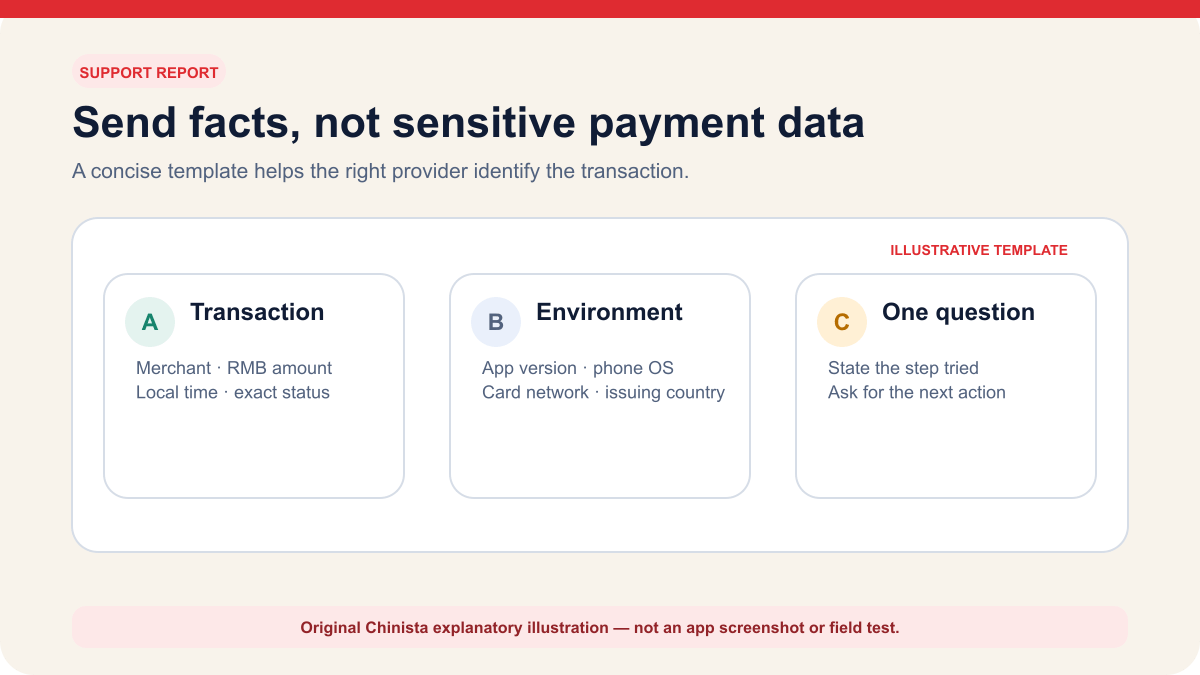
Take a screenshot of the complete message, hiding the full card number, passport details, balance, payment code and any one-time password before sharing it. For support, note the merchant name, RMB amount, local time, wallet, last card digits and the payment status: failed, pending or successful.
For a pending or unknown result, stop new attempts for the same order, even if only one entry appears. Ask the merchant to check that order and the wallet provider or issuer to clarify the relevant record. A pending bank authorization is not a completed charge, and the wallet and bank may show different stages. If the wallet says successful but the merchant cannot see it, show the non-sensitive receipt and ask the merchant to trace the original payment rather than initiating a fresh transfer.
Cash or another card can cover a different essential purchase, but switching methods does not cancel an unresolved payment for the same order. If that same purchase cannot wait, coordinate with the merchant before paying again, keep evidence of both attempts and agree how any confirmed duplicate will be handled. This can still result in two charges; do not assume an automatic refund.
Do not assume a payment problem will reset after twenty-four hours. Follow the exact waiting period or support instruction shown in your account. If no period appears, use an official help channel instead of guessing.
Find the stage that failed
A payment can fail at several stages. The wallet checks the account and card, including any identity or risk requirements. The purchase must be eligible, the bank must authorize it and the merchant must receive and record the payment. An error message may not identify which step failed. Note what happened just before it appeared.
If the card will not link, stay in the card-linking path. Recheck the cardholder name, expiry date, billing information requested by the app, and the bank's verification step. Government guidance says binding requires authorization from the issuing bank and directs users to the payment provider or issuer when it fails. Do not test the same card at a merchant until the app clearly shows that linking is complete.
If the card is linked but does not appear at checkout, the purchase may fall outside the wallet's international-card service, the account may need another verification step, or a provider limit may apply. Tenpay describes its international-card feature as a consumer-purchase service and says available scenarios and limits are shown on the service page. Read that page before assuming the bank declined anything.
If the card appears, you approve the purchase, and the bank declines it, move to the issuer. Check whether international, online, or mobile-wallet transactions are enabled. Use the number on the card or the bank's own app. Tell the bank the RMB amount, local time, merchant name, and wallet. Never read a one-time password or payment PIN to a caller.
| What happened | Likely stage | Next action |
|---|---|---|
| Card cannot be added | Wallet setup or issuer verification | Recheck entered details, then use official wallet or issuer support |
| Linked card is unavailable at checkout | Merchant eligibility, account status or provider limit | Read the in-app explanation; check for an existing payment before using another method |
| Bank sends a decline alert | Issuing bank | Confirm the exact purchase through the bank's official channel |
| Wallet pending, timeout or unknown result | Status needs confirmation; a bank hold may still be pending | Stop new attempts for this order; check wallet, bank and merchant records |
| Wallet shows success, merchant sees nothing | Merchant order matching | Use the wallet receipt and ask the merchant to check the original order |
| Duplicate completed charges confirmed | Payment or order reconciliation | Contact the merchant with both records; ask the issuer about unresolved card charges |
Try again only after the earlier payment is resolved
Only consider another attempt once the earlier payment is resolved and the wallet or issuer is not asking you to stop or wait. For a small purchase you actually need, change one thing, such as an eligible card or wallet, then record the result. Stop if it becomes pending, unknown or restricted. A successful purchase does not establish that every merchant or future payment will work.
Do not spend money solely to diagnose the app, assume a test purchase will be easy to refund, or retry an unresolved order through another method. Refund eligibility and timing depend on the merchant, provider and issuer. Do not create artificial high-value transactions, deliberately trigger account locks, or cancel train orders merely to capture an error screenshot.
International cards linked to a wallet are designed for supported consumer payments. A personal transfer request may not be eligible even when a printed QR code looks familiar. Ask whether the code is the business checkout. If the linked card disappears only for that code, first check that no payment was started before choosing the merchant's normal checkout or another accepted method. Do not ask a stranger to receive the money privately on your behalf.
The network matters mainly when the app cannot load, the confirmation page times out, or the bank's approval cannot return to the wallet. Save the current status before switching networks. If a VPN or filtered hotel Wi-Fi is involved, close the payment attempt, return to a trusted connection, and check history before starting a new one. A timeout can still leave an authorization behind.
When to stop trying to pay
Stop immediately when the app reports too many attempts, account restriction, identity review, or a request to wait. The provider controls that state. Another card, another amount, or another merchant will not remove an account-level review. Keep the screenshot and use the support route inside the app or on the provider's official site.
Stop new attempts for the same order as soon as any payment is pending or its result is unknown; do not wait for two entries. Multiple records alone do not establish two completed charges. Check each record with the merchant, wallet provider or issuer as appropriate. If you urgently arrange another payment for that order, keep both receipts and the merchant's explanation: a different payment method does not remove the duplicate-payment risk.
Stop when anyone asks for remote screen control, an SMS code, a payment password, a full card photograph, or a transfer to a personal account for verification. Genuine support may need transaction identifiers and identity checks inside an official flow. It does not need the secret that approves a new transaction. End the conversation and reopen support from the app or the number on the card.
Do not approve a payment unless you recognize the merchant, amount and purpose. If the cashier changes the amount, replaces the QR code or asks you to approve a screen you cannot read, pause and ask for clarification or translation. If you already approved an attempt, check its status before arranging another payment.
- Account lock, identity review or too-many-attempts message.
- Any pending payment or unknown result for the same order, even a single entry.
- Any request for a password, one-time code or remote access.
- A merchant name or amount that does not match the purchase.
- A support link received from an unverified chat, search ad or QR sticker.
Give support the details they need
Use the wallet provider for account verification, card-linking screens, missing payment methods, fee displays, and wallet transaction status. Use the issuing bank when the wallet identifies a bank decline, the bank sends a fraud alert, or the charge appears incorrectly on the card account. Use the merchant when the wallet says successful but the order remains unpaid or the goods were not delivered. Alipay's official Service Hall also provides its support routes; use the Help channel inside the wallet you used or a provider's official website, not a search advertisement or an unsolicited message.
Prepare a short factual report. Include the wallet and app version, phone operating system, account region, card network and issuing country, merchant, RMB amount, local time, exact status, and the troubleshooting step already tried. Share only the last four card digits when support needs to identify the card. Upload identity or card documents only inside the provider's authenticated flow.
Ask about the specific failure. If a linked card is missing at checkout, ask whether the merchant transaction supports international cards. For a decline, ask whether the bank blocked that RMB transaction and whether international mobile-wallet purchases are enabled. For a pending authorization, ask what happens next and how to check its status.
For a duplicate or wrong amount, keep the merchant receipt, wallet record and bank entries together. Check which entries are pending and which are completed. If duplicate completed payments are confirmed, ask the merchant to reconcile the order and refund the extra payment; keep their response. If it remains unresolved, contact the wallet provider or issuing bank as appropriate and ask about the applicable dispute process and deadline. No refund or resolution time is guaranteed here.
You can contact your issuer about a pending entry immediately; whether a formal dispute can start depends on that issuer and card type. For example, Chase's US guidance requires credit-card charges to post before a dispute, but allows pending debit-card disputes by phone. That is an issuer-specific example, not a rule for all overseas cards. Follow your own issuer's instructions rather than using a chargeback as a way to refresh payment status. If you suspect an unauthorized charge or card theft, contact your bank immediately through its official channel; do not wait for a merchant refund or for the charge to post. Save the case number and any response time the provider gives you.
The source check on 19 September 2026 covered Alipay's official Service Hall for support contacts, and Chase US and UK guidance on pending and completed entries and recovery options for their cardholders. It did not verify exact WeChat Pay or Alipay screens, refund timing for every overseas card or a completed real-world payment.
Check your backup before the next urgent purchase
Once the immediate problem is under control, check your other payment options. Confirm that the wallet opens, the bank has not frozen your physical card and you still have enough cash for a meal and local transport. If one card failed in both wallets, use another primary method until the issuer explains why. ATM access does not establish that a card can make online or mobile-wallet payments.
Record what changed and any confirmation you received. Note the date of a completed identity review or the bank's confirmation that it enabled international transactions. If one merchant code was ineligible, record that specific problem so you can recognize it at another checkout.
A lost phone needs a separate response. Use another trusted device or the provider's published channel to secure the wallet, then contact the bank if the linked card may be exposed. Remove the phone from account sessions where available. Do not sign into a financial account on a stranger's phone or hand over the card so someone else can add it to their wallet.
Before moving on, establish which method works, which is waiting for support and how you will pay for the next essential purchase. Continue any further investigation when you have a reliable connection and can reach the right support team.
Continue the setup
Tasks connected to this guide
When Plan A fails
Fallbacks and safety checks
- Stop new attempts for the same order if any payment is pending or unknown, even a single entry. Changing methods does not cancel it.
- Do not share an SMS code, payment PIN or screen-control access with unofficial helpers.
- If your phone is lost, contact the wallet provider and bank using their official channels.
Common questions
Frequently asked questions
Why was my foreign card declined in a Chinese payment app?
The page cannot diagnose a bank or provider decision. Read the exact error first; identity verification, provider rules and the issuing bank can each be responsible.
Should I keep retrying a failed payment?
Stop new attempts for the same order if any entry is pending or the result is unknown. Check wallet, bank and merchant records first. Use an accepted fallback once failure is clear, no pending or successful record remains, and the merchant confirms the order is unpaid. Switching methods does not cancel the original attempt.
Who should I contact about a failed payment?
Ask the merchant to check the original order, the wallet provider about account or wallet status, and the issuing bank about card declines or charges. Use official channels. For suspected unauthorized charges or card theft, contact your bank immediately rather than waiting for the payment to post.
Why does my linked international card disappear at checkout?
The merchant transaction may not support the wallet's international-card service, an account check may be incomplete, or a provider limit may apply. Read the in-app explanation before asking the bank to approve another attempt.
Can I use an international card with a personal QR code?
International-card wallet services cover eligible consumer purchases. Personal transfers may use a different payment method. Ask for the merchant's normal business checkout, and check that no payment was started before choosing another accepted method.
What should I do when the wallet shows a pending payment?
Stop new attempts for that order, even with only one pending entry. Check the wallet, bank and merchant records; a pending bank authorization is not a completed charge. If the same purchase cannot wait, coordinate with the merchant before arranging another payment and keep both records. Duplicate charges can still occur, and an automatic refund is not guaranteed.
Evidence
Primary sources
Source list last checked: .
- 2025 guide to working and living in China
- Tenpay Weixin Pay international-card user agreement
- Tenpay 2026 international-card service fee rules
- Alipay official Service Hall — support routes (checked 19 September 2026)
- Chase US — charge errors, fraud and card-specific dispute rules (issuer example; checked 19 September 2026)
- Chase UK — pending card transactions (issuer example; checked 19 September 2026)