Booking & transport
Source checkedHow to Use Didi in China: English App Guide (2026)
Book a Didi ride in English with a foreign phone number and international card, with a fallback for driver calls. Last checked 18 August 2026.
The short answer
Foreign travelers can book rides through Didi, Alipay or WeChat using a foreign phone number and international card. Prepare the pickup and destination in advance, and keep a written Chinese address ready as the fallback when the driver calls.
Jump to a section
Step by step
What to do
- 01
Install Didi and register before you land
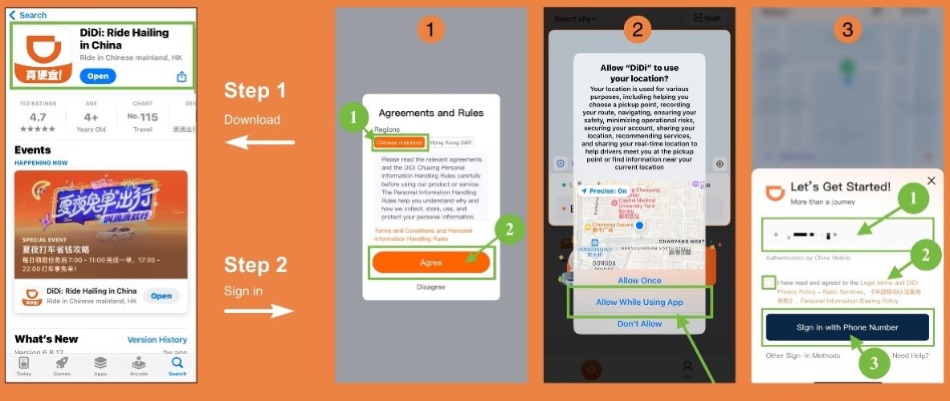
Download Didi from your official app store and set up the account and payment before your first airport ride. The current government guide says Didi-Greater China supports foreign phone numbers and international cards.
- 02
Book through Didi, Alipay or WeChat
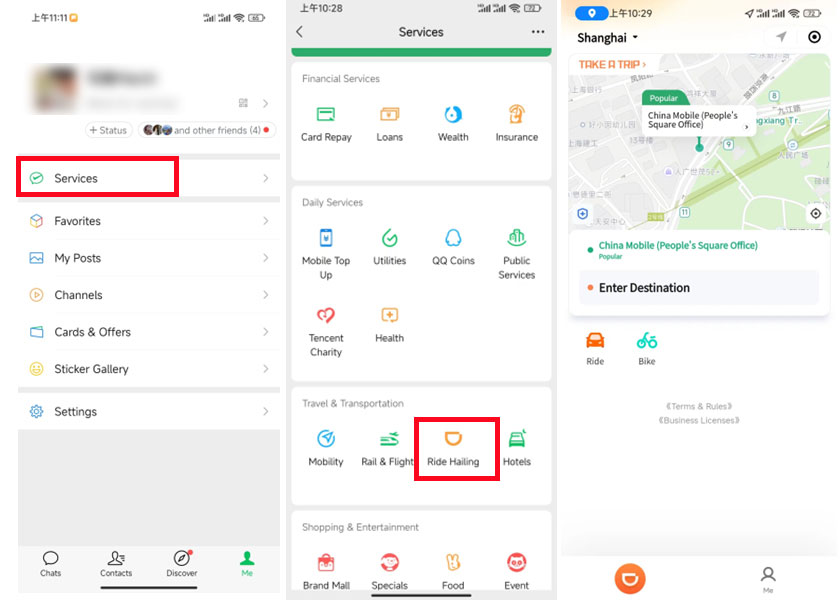
Use the Didi app directly, or start from Alipay (Transport then Taxi) or WeChat (Me, Pay and Services, then Mobility or DiDi Ride-Hailing). Enter the pickup and destination before confirming so the driver receives the right meeting point.
- 03
Confirm pickup, destination and service type
Check the pickup pin, the destination and the vehicle class before confirming. The government guide names Express, Taxi, Premier and Luxe as service choices; the price and car type depend on what you select.
- 04
Keep the hotel address in Chinese ready
Save your hotel or destination name and address in Chinese characters offline. A driver may call to confirm the meeting point, and a written Chinese address lets you show the driver or a helper exactly where to go.
- 05
Verify the car before you get in
Match the license plate and driver shown in the app before entering. Enable location services so the driver can find you, and use only the official or well-known booking path.
The three ways to book a ride
Official guidance lists three ways for foreign travelers to book rides: Alipay, WeChat and Didi-Greater China. Providers, vehicles and payment options can differ between them and between bookings.
Set up one booking option before landing and keep a second available as a backup. You do not need every app. The table below shows where to find each service and how payment works.
| Booking path | How to open it | Payment | Best for |
|---|---|---|---|
| Didi app | Download the Didi-Greater China app and register with a foreign number and card | Linked international card | Full ride-hailing features and the English interface |
| Alipay | Open Alipay, tap Transport, then Taxi | Alipay wallet or linked international card | When Alipay is already set up |
| Me, then Pay and Services, then Mobility or DiDi Ride-Hailing | WeChat Pay or linked international card | When WeChat Pay is already set up |
Set up Didi before you land
Download Didi-Greater China from your official app store and register with a foreign phone number and international card. The government guide confirms this option for foreign visitors. Complete setup at home, where you can more easily deal with network or bank-verification problems. Screens, country selectors and identity requests vary by device and app version.
Official taxi guidance describes the Didi app as available in English, and the Shanghai municipal tutorial illustrates a language setting. Menu names can move between versions, so use the current app's language setting rather than treating an older tap path as permanent.
Keep the registered number active throughout the trip so you can use it if the account needs verification or recovery.
Book your first ride
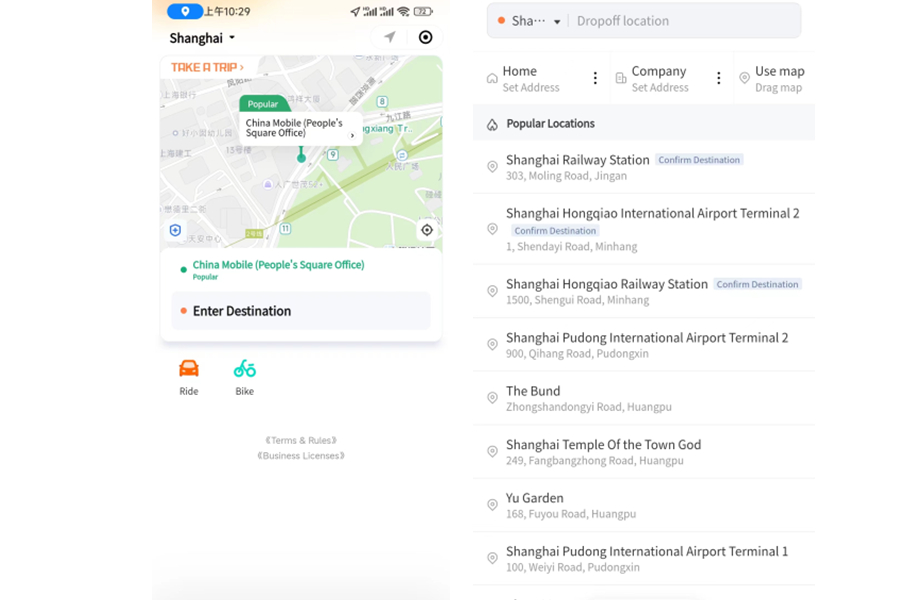
Enter the pickup point first, then the destination. Move the pickup pin to your exact location before confirming, because a pin dropped at a terminal exit or a hotel's back door sends the driver to the wrong meeting point.
The government guide names Express, Taxi, Premier and Luxe as examples of service choices. Availability and the meaning of each tier can change by city and app version, so compare the vehicle description and price shown for the actual booking.
Before confirming, check the vehicle and estimated fare. Compare other service types if the first quote looks expensive.
Pay without a Chinese number
Payment is linked to the card you added during setup, not to a Chinese phone number. The official guide confirms international bank cards are supported, and the fare is charged through the app rather than a cash exchange with the driver.
The card issuer still decides whether to approve each charge. Enable overseas online payments on your card before leaving, and keep a physical card and some RMB cash as an independent fallback if the in-app charge is declined.
If you book through the Alipay or WeChat entry instead of the Didi app, the payment runs through the wallet you already set up there. This is a useful second path when the standalone Didi app has trouble on your device.
- Link the card in your own name; the driver is not the person to ask about a declined payment.
- Keep the issuing bank's verification method accessible for any approval prompt.
- Carry RMB cash for a metered taxi fallback, since not every street taxi takes cards.
When the driver calls you in Chinese
A driver may call to confirm the pickup point, and you should not assume the call can continue in English. When the current booking screen offers a contact or message option, use it; otherwise show the saved Chinese address to airport, hotel or station staff who can help with the call.
Prepare this before the ride. Save your hotel name and address in Chinese offline, then paste or show it when the driver calls. A short prepared message such as 'I do not speak Chinese; please send a message' gives the driver a clear request, but exact contact options depend on the current app and trip state.
Keep payment codes, login codes and control of your phone private. A driver does not need them to complete a ride.

Street taxis and the 95128 hotline
You can still hail a taxi by waving at one showing a vacant sign, but the official guidance warns a street taxi may already be on the way to an app-booked passenger and may not stop. Online booking is recommended for reliability.
In many cities, 95128 provides taxi booking by phone for people who cannot or prefer not to use an app. If the app fails or your card is declined, try the hotline or a street taxi, which will generally take RMB cash.
Use an official taxi rank at airports and large stations rather than accepting a ride from someone who approaches you inside the arrivals hall. An unlicensed driver cannot offer the same protections as a metered taxi or an app booking.
Safety checks before you get in
Enable location services so the app and driver can find your exact position. Then, before opening the door, match the license plate and the driver shown in the app with the car in front of you.
Official taxi guidance recommends checking the plate and driver information and using official or well-known platforms. Cancel and rebook if the car or driver differs from the booking.
Inside the car, follow the route shown on your own phone rather than a driver's suggested detour. A meter or an agreed app price should be the only fare discussion.
- Match the plate and driver photo before entering.
- Use only the official app or a known taxi rank to start the ride.
- Keep your phone charged and your destination address available offline.
Continue the setup
Tasks connected to this guide
When Plan A fails
Fallbacks and safety checks
- If the driver calls and you cannot speak Chinese, message in the app or show the saved Chinese address instead of relying on a phone conversation.
- If Didi is not available on your device, book through the Alipay or WeChat ride-hailing entry, or call the 95128 taxi hotline where available.
- If card payment fails in the app, keep a physical card or RMB cash for the fare or an alternative taxi.
- Never share payment codes, login codes or screen control with a driver or stranger offering to help you book.
Common questions
Frequently asked questions
Can foreigners use Didi in China?
Yes. The State Council's current Working and Living in China guide states that foreign travelers can book rides through Alipay, WeChat or DiDi Travel, and that the Didi-Greater China app supports registration with a foreign phone number and an international credit card.
Do I need a Chinese phone number to register for Didi?
No. The current official guide states that the Didi app supports foreign mobile phone numbers for registration. Keep the number you register with accessible during the trip, because account recovery and any verification checks depend on it.
Which payment cards work with Didi in China?
The official guide states international credit cards are supported for payment. Actual acceptance still depends on your card issuer and the specific transaction, so keep a physical card or RMB cash as a backup for the fare.
What should I do when the Didi driver calls me?
Save your destination address in Chinese characters. If the current trip screen offers a contact or message option, use it; otherwise show the saved address to airport, hotel or station staff who can help with the call. Do not assume a message control is available in every app version or trip state.
How do I pay for a Didi ride as a foreigner?
Link an international card in the Didi app before booking, or use the Alipay or WeChat ride-hailing entry where your linked card is already set up. The official guide confirms international bank cards are supported for payment.
Is it safe to hail a street taxi in China?
You can wave down a taxi with a vacant sign, but a street taxi may already be booked through an app and may not stop. The official taxi guidance recommends booking online for reliability, enabling location services, and verifying the plate and driver before you enter.
Evidence
Primary sources
Source list last checked: .