Phone setup
Source checkedChina Travel Apps: A Minimal Setup
Choose and test a few apps for payment, trains, rides, maps, translation and communication in China.
The short answer
Install the apps you need and check that you can use them before departure. Save payment backup details, train and ride bookings, maps, translations and contacts outside any single account.
Jump to a section
Step by step
What to do
- 01
Choose apps for the tasks you need
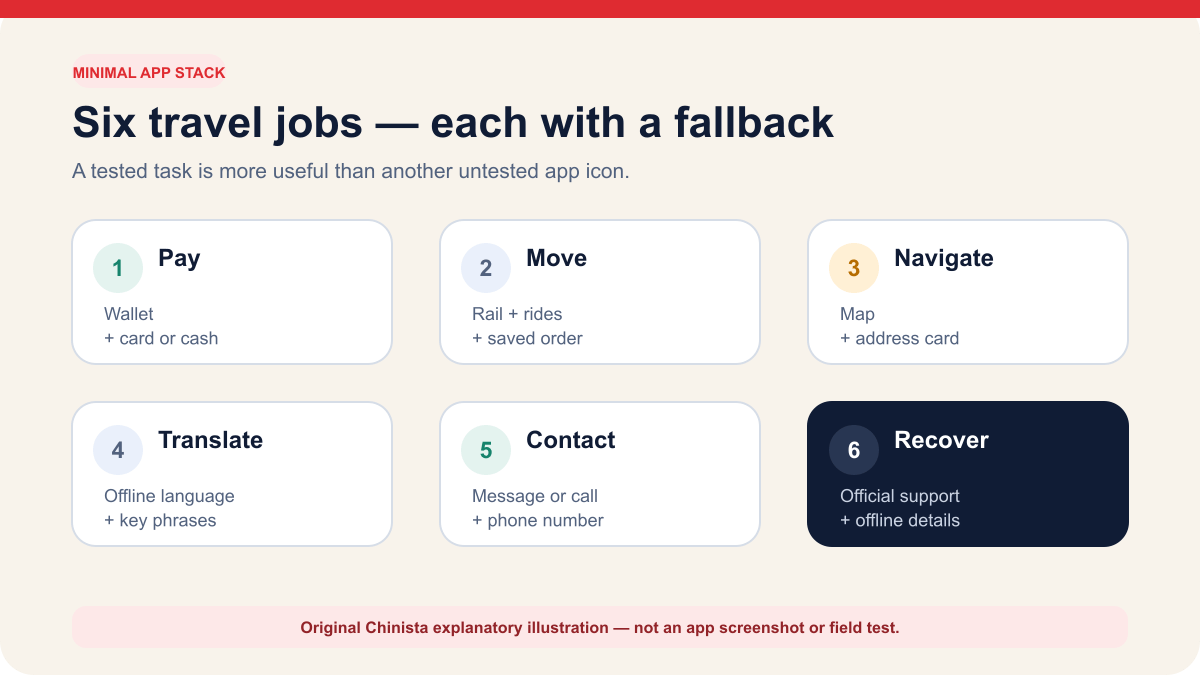
Cover six jobs: payment, rail, rides, maps, translation and communication. An app may handle several, but keep an offline or non-app backup for each essential task.
- 02
Test sign-in and account recovery
Open every essential app before departure, sign in, search a real Chinese address and confirm the phone number, email or authenticator used for recovery will remain reachable abroad.
- 03
Download offline essentials
Save hotel addresses, bookings and key phrases outside the apps so one account failure does not block the trip.
Choose apps for the tasks you need to complete
Set up your phone for six tasks after landing: make a small payment, find your location, show a destination, communicate a simple sentence, retrieve a transport booking and contact the person expecting you. Choose a working option for each. Keep duplicates when they provide a useful backup, and remove those that only add another login.
The State Council's visitor guide lists WeChat, Alipay and UnionPay for mobile payments, and Alipay, WeChat and Didi-Greater China for ride booking. China Railway's official 12306 English service handles rail purchases, changes and refunds. Store listings, registration steps and screens may differ between phones.
Test maps, translation and communication on the phone you will bring. Search your hotel's exact Chinese name, translate a sentence offline and try the message or call service you expect to use. Check that the accounts work after installation.
| Travel job | App or service | Check before travel | Backup |
|---|---|---|---|
| Payment | Alipay, WeChat Pay or an eligible home wallet | Account opens and funding source is visible | Physical card plus RMB cash |
| Rail | Official 12306 English website or app | Passenger record matches the passport | Station ticket office with original passport |
| Ride | Didi-Greater China or ride service inside Alipay or WeChat | Chinese pickup and destination can be selected | Written address and staffed taxi queue |
| Map | A map that resolves your real Chinese destinations | Hotel and station pins match written addresses | Saved map screenshots and Chinese address card |
| Translation | Device translation with Chinese downloaded offline | A saved phrase translates without mobile data | Bilingual address and essential phrases |
| Communication | Hotel/platform channel plus phone or messaging | Contact replies through a route available abroad | Phone number and booking reference saved offline |
Set up payment and keep a card and cash backup
Payment setup may involve separate registration, identity checks, card linking and bank verification. Government guidance says overseas visitors can register WeChat, Alipay or UnionPay with a foreign or Chinese phone number and link eligible international cards. Card brands, limits and fees vary by product. If linking fails, contact the payment provider or issuing bank.
Before travel, check that the account opens, the intended card is linked and selected, and you can receive the bank's verification requests. You do not need to invent a purchase to test it. After arrival, make an ordinary low-value purchase before relying on the wallet for a timed train, hotel deposit or attraction booking.
Keep a physical card and some RMB separately. Both wallets can fail if they use the same blocked card or locked phone. Check what you would use if your account, phone, network, wallet or bank were unavailable, or if a merchant could not accept your chosen method.
- Record the issuer's international support number without copying the card number.
- Keep the home phone number able to receive the bank's required verification method.
- Read the RMB amount, merchant, funding source and disclosed fee before approval.
- If status is pending, check wallet and bank history before trying again.
Prepare train bookings and ride hailing separately
China Railway 12306 ties tickets to your identity document. Its English FAQ says the English website accepts valid foreign passports and provides ticket purchases, changes and refunds. Create the passenger record from the passport you will carry. Save the train number, exact station name, date and order status outside the app.
Ride hailing solves a different problem. The State Council guide describes routes through Alipay, WeChat and Didi-Greater China, including foreign phone-number and international-card support for Didi-Greater China. Exact menus can vary, so prepare the destination before pickup. Save the hotel's Chinese name and full address, and verify that the map pin is the correct branch rather than a similarly named property.
Keep a separate record of the seller, transport operator and payment for each booking. If you buy through a third party, you may have to request changes and refunds through that seller.
- For rail, the original passport is part of the journey; a screenshot alone is not the travel credential.
- For rides, a screenshot of the destination and a bilingual address can still work when messaging fails.
- For airports and stations, save the terminal or station suffix in Chinese as well as the city name.
- For any timed booking, record the cancellation owner before paying.
Test maps and translation with your actual addresses
Map coverage, language support and availability vary by phone platform and region, and can change. Test your actual itinerary: search the accommodation's Chinese name, compare the pin with the address from the property, and find the correct airport terminal or railway station. Save the results offline.
A map can return a plausible but wrong branch. This is common enough to deserve a deliberate cross-check: compare the Chinese characters, phone number and surrounding landmark. If the property sends a map pin through a messaging app, also ask for the full text address so the information can survive outside that account.
Download Chinese language data through the phone's official translation product, switch off mobile data and try translating a saved sentence. Prepare readable bilingual phrases and destination addresses for arrival. Camera translation and live conversation modes can also help, but should not be your only way to communicate.
- Save the accommodation name, address and phone in both Chinese and your reading language.
- Screenshot the route from the airport or station while the device is online.
- Do not publish or share a booking screenshot that exposes passport or reservation data.
- Keep emergency numbers as text; do not rely on a search result during an emergency.
Check sign-in and account recovery before travel
Open each essential app, finish registration and check how to recover access. If it depends on your home SIM, confirm that the line will stay active and whether receiving verification messages could trigger roaming charges. Test email or authenticator access independently of the app or network you may need to recover.
Save official store links or websites in a note. If an app is unavailable in your regional store, use the vendor's official listing or website, or another verified service. Avoid unknown download sites, especially for apps that handle money or identity documents.
Do not ask a stranger to complete account verification, scan an unknown QR code or take remote control of the phone. Some products may trigger additional checks based on account state. Follow the current authenticated screen and official support channel rather than buying a supposed verification service.
- Turn on automatic updates only if you accept interface changes close to departure; otherwise update and test deliberately.
- Use the device passcode and biometric protection, but know the passcode if biometrics fail.
- Record support URLs, not passwords or one-time codes.
- Remove permissions that an app does not need for the travel task.
Save your arrival details offline
Keep arrival details accessible even when you cannot sign into an account. Save your first accommodation's Chinese name, complete address, phone number and booking reference in a plain note or exported arrival plan. Add your flight number, arrival terminal, first transport route and a staffed backup option.
For each intercity train, keep the train number, date, departure time, exact station in Chinese and seat details. For every attraction with real-name booking, keep the confirmation while protecting the passport number from casual display. For payment, store support channels and a simple description of the funding route, never the full card number, PIN or verification codes.
Check that you can find and read the details with one hand and the screen dimmed. Keep the address card near the top of your notes or somewhere else you can open quickly at a taxi rank. Share only the non-sensitive details a trusted travel companion may need.
- Accommodation address card in Chinese and English
- Arrival route plus last practical staffed fallback
- Booking references with seller and operator clearly named
- Emergency contacts and insurance assistance channel
- A modest payment backup kept separately from the primary phone
Spend fifteen minutes checking offline access
The night before departure, put your phone in airplane mode and open your arrival address, booking references, transport route and essential phrases. Restore connectivity and open the accounts you need. This checks your preparation, though apps may behave differently once you are in China.
Check your backup for each task. Have a physical payment method for dinner if the wallet locks, a written address if the map pin is wrong, and a message or desk contact if a driver calls in Chinese. Keep your passport and order details available for official railway support if you cannot open the account.
Once you have a working option and an independent backup for every essential arrival task, the phone is prepared. You can add restaurant, social, video and travel-inspiration apps later. Keep the initial setup small enough to maintain and use easily.
Continue the setup
Tasks connected to this guide
When Plan A fails
Fallbacks and safety checks
- If an app is absent from your regional store, do not sideload an unknown package; use the product's official store listing or web service.
- If one account fails, switch to the independent fallback recorded for that task instead of repeatedly reinstalling or re-verifying.
- Exact menus change by device, language and account state. Follow the current authenticated screen and never share one-time codes with a helper.
Common questions
Frequently asked questions
Which apps do I need before traveling to China?
Cover payment, rail, rides, maps, translation and communication. The best list is the smallest set you can sign into and test on your own phone, with an offline fallback for every arrival-critical task.
Should I install China travel apps before departure?
Install and test essential access before departure, including sign-in and account recovery. Availability can differ by device, account country and app-store region.
What information should I keep outside the apps?
Save hotel addresses, booking references, transport details and essential contacts offline so one account or connectivity failure does not block the trip.
Can I use one super-app for everything in China?
A single app may cover payment, rides and mini-programs, but one account lockout would then affect several tasks. Keep the hotel address, bookings, payment fallback and transport route independently available.
Evidence
Primary sources
Source list last checked: .